Sysero Blog

Insights, Updates & Thoughts

Read about the latest developments in legal tech, our product updates, and industry analysis.

July 2026Phil AytonAI & Automation

3 game-changing uses of AI in law firms

Everyone has seen the demos of AI writing poetry and passing bar exams, but the real value in law firms comes from three far less glamorous places: drafting grounded in your own know-how, turning your best documents into automated templates, and killing the copy-and-paste drudgery of client onboarding. Here is how each one works and why they matter.

1. AI-assisted drafting grounded in firm knowledge
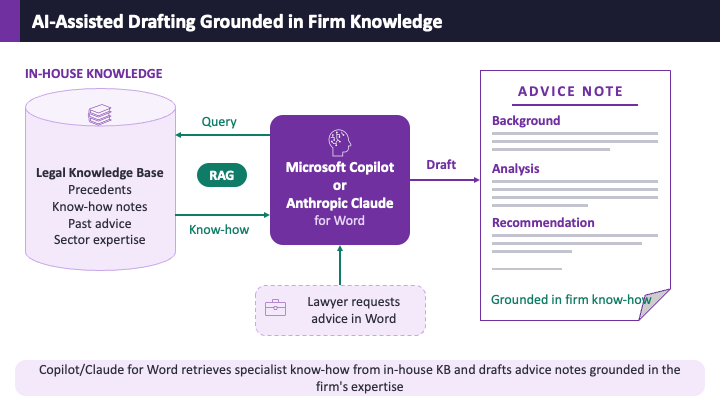
AI-assisted drafting grounded in firm knowledge — Copilot or Claude for Word querying a legal knowledge base via RAG to draft an advice note

Ask a general-purpose chatbot a legal question and it will answer from whatever it absorbed from the internet — confidently, and not always correctly. The alternative is to ground the AI in your firm's own knowledge base: precedents, know-how notes, past advice and sector expertise. Using Retrieval Augmented Generation (RAG), Copilot or Claude for Word first retrieves the relevant know-how from your library, then drafts the advice note from that vetted content — with the sources attached so the lawyer can verify the answer in seconds.

Does grounding actually improve accuracy? The research — and now the regulators — say yes. Stanford's Large Legal Fictions study (Journal of Legal Analysis, 2024) found that general-purpose chatbots hallucinate on legal queries between 58% and 88% of the time — a model will happily "invent a plausible case name, court citation and summary, all of which will look credible to a human reader unless checked", as the Bar Council's updated AI guidance puts it. That guidance goes further: it explicitly recommends retrieval augmented generation as the way to reduce hallucination, by grounding the AI's output in authoritative sources rather than letting it answer from memory. This echoes the original RAG paper from 2020, which showed retrieval-grounded models generate "more specific, diverse and factual language" than models answering from memory alone.

Two honest caveats. First, RAG reduces hallucination — it does not eliminate it, which is why a lawyer reviews every draft. Second, the consequences of skipping the grounding step are no longer hypothetical: in May 2026, Pinsent Masons referred itself to the SRA after AI hallucinations and misstatements of law twice made their way into court submissions, with the judge warning that AI "has the potential to be wholly unreliable" and "does not, at least at present, do away with the need for proper research".

The result is a first draft that reads like it was written by your firm, because in a very real sense it was. The AI provides the speed; your knowledge base provides the accuracy and the house style. The better maintained your library, the better the output — which is exactly the incentive knowledge management teams have been waiting for.

2. AI-assisted automated drafting
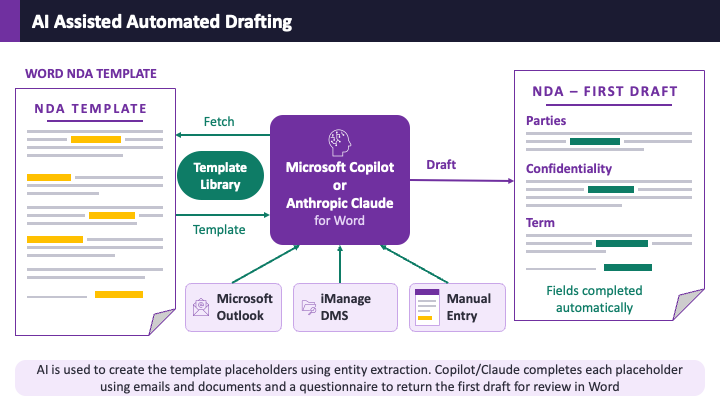
AI-assisted automated drafting — Copilot or Claude for Word converting an NDA into a template and completing the first draft from emails and documents

Document automation has traditionally required a specialist to spend days marking up templates with codes and conditional logic. AI can reduce the workload by using entity extraction to identify the parties, dates and definitions, converting each one into a placeholder. Subject Matter Experts are still required to identify the variable terms and make final adjustments, but with AI your gold-standard document becomes a reusable template in minutes (or a few hours for highly complex documents), and is saved to a managed template library complete with classifications by practice and work type, version control and roll-back.

Creating the template is only half the story. When a new matter comes in, the same AI fills the template using data it finds in client emails from Outlook and documents in your iManage DMS. Whatever it cannot find with confidence is presented to the lawyer as a short questionnaire — so the human checks the extracted values, supplies the judgment calls, and completes the draft. The first draft arrives in minutes with the formatting, clause structure and house style of the original fully preserved, because the AI is populating an approved document rather than inventing one.

3. AI-assisted client onboarding
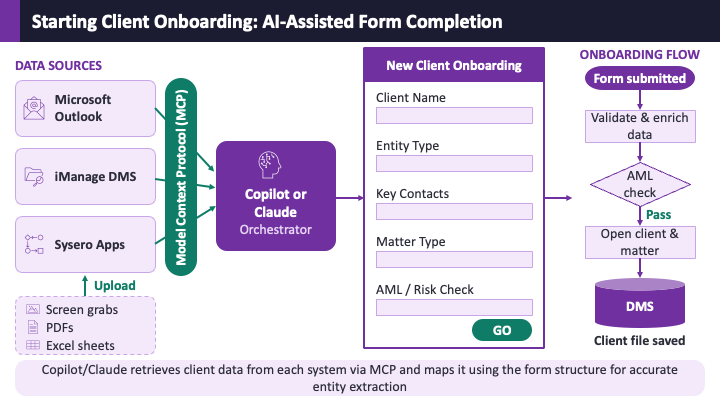
AI-assisted client onboarding — Copilot or Claude orchestrator gathering client data from Outlook, iManage and Sysero apps via MCP to complete the onboarding form

If you followed the automated drafting example above, client onboarding is the same trick applied to a form instead of a document. Opening a new matter means collecting the client name, entity type, key contacts, matter type and AML risk information — data that already exists in the referral email, the attachments, the DMS and your practice systems. Today, a lawyer or their assistant finds it and copies it in by hand, and none of that time is chargeable. That matters more than firms like to admit: Clio's Legal Trends benchmarks put average lawyer utilisation at just 38% — around three billable hours in an eight-hour day — with much of the rest lost to exactly this kind of administration.

Using the Model Context Protocol (MCP), Copilot or Claude connects directly to Outlook, iManage and Sysero apps, retrieves the client data from each system — along with anything uploaded by the user, from screen grabs to PDFs and Excel sheets — and maps it onto the onboarding form using the form's own structure to drive accurate entity extraction. The lawyer reviews the completed form and hits Go. Hours of non-chargeable data collection and copy-and-paste become a few minutes of review.

The workflow that follows is where the process really earns its keep. Once the form is submitted, the data is validated and enriched, the AML check runs, and on a pass the client and matter are opened automatically. The same workflow saves the supporting documentation gathered along the way — it can even create the matter workspace in your DMS and upload each supporting document to the correct folder, so the client file is complete and audit-ready from day one, not reconstructed from an inbox three weeks later.

Three different processes, one common thread: the AI is never asked to invent anything. It retrieves, extracts and assembles from data your firm already holds, and a lawyer stays in the loop at every step. That is what makes these uses game-changing rather than gimmicks.

June 2026Phil AytonOpinion

You're using AI wrong

I was very disappointed to discover that Steve Jobs never said "you are holding it wrong" during the Antennagate iPhone 4 scandal of 2010 (look it up). However, I maintain the position that almost anyone in the legal profession using AI right now could be using it in a more efficient, cheaper, accurate and useful way. In other words, if you want to know how to get what was promised from AI, read on.

It is common knowledge that I was a late adopter of AI (not a good look when you are CEO of a tech firm these days), and I can still be heard grumbling that there is no "I" in "AI" along with the terms Stochastic Parrot and "garbage-in, garbage-out". However, I am a big fan of the very boringly named Model Context Protocol. This is supposed to be a fun post, so I won't go into tech stuff but know that MCP is new (like AI 3 years ago) and will revolutionise the legal industry (is that so?).

You may have heard about Anthropic Fable and the great fun that saga has produced, particularly in the UK and EU governments, who have finally realised the Donald Trump owns AI and can turn it off when he feels like it. Fable, and its partner Mythos (who names this stuff?) are the cream of the AI crop and demonstrate a move to pay-per-use for the very best AI has to offer. This is happening in a climate where companies like Microsoft, Amazon, Uber and Klarna have all had to cut back on AI use because it's just too darn expensive.

As the very best AI is getting more expensive, OpenAI, Anthropic and Microsoft have actually reduced the costs of their fixed price plans over the last few months. To make this work, we are starting to see the best models excluded, or offered under limited access, in the fixed price plans. However, it turns out that while you need the best AI when writing the next game-changing piece of software or curing cancer, it's a bit overboard when drafting a document or filling in a boring compliance form. Indeed the "thinking" models just slow the whole thing down in a market where speed is of the essence.

MCP (sorry back to that) allows law firms to plug the apps they use every day into the cheap fixed plans provided by the big 3 AI vendors (I don't include Google here, but they will catch up — just watch). This means you can open Copilot in Word and use it to get information from a client email thread, summarise your current work from iManage and draft the perfect advice document using a template in Sysero (obviously I am plugging my own product, but other automation tools are available, probably). Whilst we are talking about me, I would personally use Claude over Copilot as it has a lot of neat features like Skills, which are basically macros for AI, but making the best of what you have already got is rather the point of this post.

Regardless of your choice of Microsoft over Anthropic, OpenAI over Google (really?), the point is that plugging your existing apps into them suddenly shifts the gears on the use of AI in business. You are now basing your AI's responses on your data and not the garbage that occupies much of the internet. I have used Outlook my whole career and the search has always been dreadful. The search tools are in there, but who has the time to use them? From Claude I can summarise my recent chats with a client in a couple of seconds if I use the fastest and cheapest model, Haiku. The same can be done in Copilot by enabling the Quick Response setting. While I can't be bothered to use Outlook's archaic search tools, my old buddy Claude gets right on it. Same with documents in my DMS. Turns out DMS's have really good search engines (who knew?) but you need to put effort in to find the right stuff and really, who has the time or energy to do that?

Connect your existing apps to a fixed-price AI plan, use cheaper models for everyday tasks, and you suddenly get the best of everything: your data, your tools, and an interface that helps you think. Used this way, the apps you have been paying for do most of the work, while your data is made easily understandable to an AI model that barely needs to break a sweat. In the near future, perhaps we could run open-source AI on UK- and EU-based servers, leaving Mr Trump free to do whatever he likes without ruining our day.

The author runs a UK software company, so his views should be taken with a pinch of salt.

May 2026Phil AytonAI & Automation

Using Claude Skills with Sysero Workflow

Claude Skills are used to automate tasks in much the same way as macros were used by non-technical subject matter experts to guide people through processes they designed. We think of them as "workflow-lite" and, like macros, they can help guide people through using Sysero workflows and take much of the heavy lifting and cut-and-paste work out of the client onboarding process.

In their most basic form, Claude Skills are AI prompts that you save and run using a slash (/) command. In this demo we have created a command called /kyc to run the following 6-step process:

  1. Ask for a source email — Most information in companies is sent through emails. The skill starts by prompting the user to describe the Outlook email they want to use as the source for the KYC (sender, subject, approximate date, etc.).
  2. Search Outlook — The skill looks into the users Outlook inbox to locate an email based on the user's description.
  3. Load the KYC app from Sysero — Sysero can have many apps, this step locates the correct app and works out what information it needs to run the workflow.
  4. Extract and map values — Using a Sysero form, the skill tells Claude to find the information it needs from the email.
  5. Review and confirm — The information needed is shown to the user for confirmation. Users could change the information at this point if needed.
  6. Run the workflow — The information is sent to Sysero and used to fill in the client onboarding form and start the workflow. The first step in the Sysero client onboarding workflow sends an email back to the user so they can link to the form and carry on the workflow.

Skills are a unique Claude feature and can be created by subject matter experts for small processes or, as in this demo, to take some of the workload out of using structured, full-fat workflows.

Subscribe to our newsletter

Get the latest insights delivered directly to your inbox.

Subscribe Now